Designing the Yappes API management platform: 30+ features from API setup to gateway policies to billing
I designed the Yappes API management platform with the engineering team: 30+ features, from bringing an API in, to the rules it runs at the gateway, to billing.
Yappes is an API management platform. Teams use it to bring their APIs in, control how they behave at the gateway, and share or sell them in a marketplace. Over two years I designed the whole product, from first API setup to encryption and billing.
- ROLE
- Senior Product Designer
- ALSO OWNED
- Marketing website, LinkedIn posts, pitch decks
- TEAM
- VP Engineering, CTO, backend, gateway and frontend engineers
- TIMELINE
- Mar 2024 to Feb 2026
- PLATFORM
- Web console for API developers and platform admins, across REST, SOAP, GraphQL and WebSocket
- SCOPE
- Research, flows, UI, prototypes, design QA with cURL and gateway try-outs
One console for three different jobs
Yappes had to match Kong and Apigee feature by feature, with a small engineering team. The console had three jobs: bring APIs in, control how they behave at the gateway, and share or sell them. Gateway features grew the fastest, one at a time: caching, then routing, then encryption. If each one got its own screen and its own rules, the console would get harder to learn with every release, and engineers would rebuild the same UI each sprint.
I learned this from interviews with the VP Engineering and the backend, gateway and frontend engineers, and from benchmarking Kong, Apigee, AWS API Gateway, Tyk and MuleSoft.
 Kong
Kong Apigee
 AWS API Gateway
 Tyk
Tyk MuleSoft
What I designed
Not every feature is a policy. The platform has three kinds of features, and each one needed a different design approach:
- Platform flows, like onboarding, the marketplace and billing. Each has its own screens, because each is a different job.
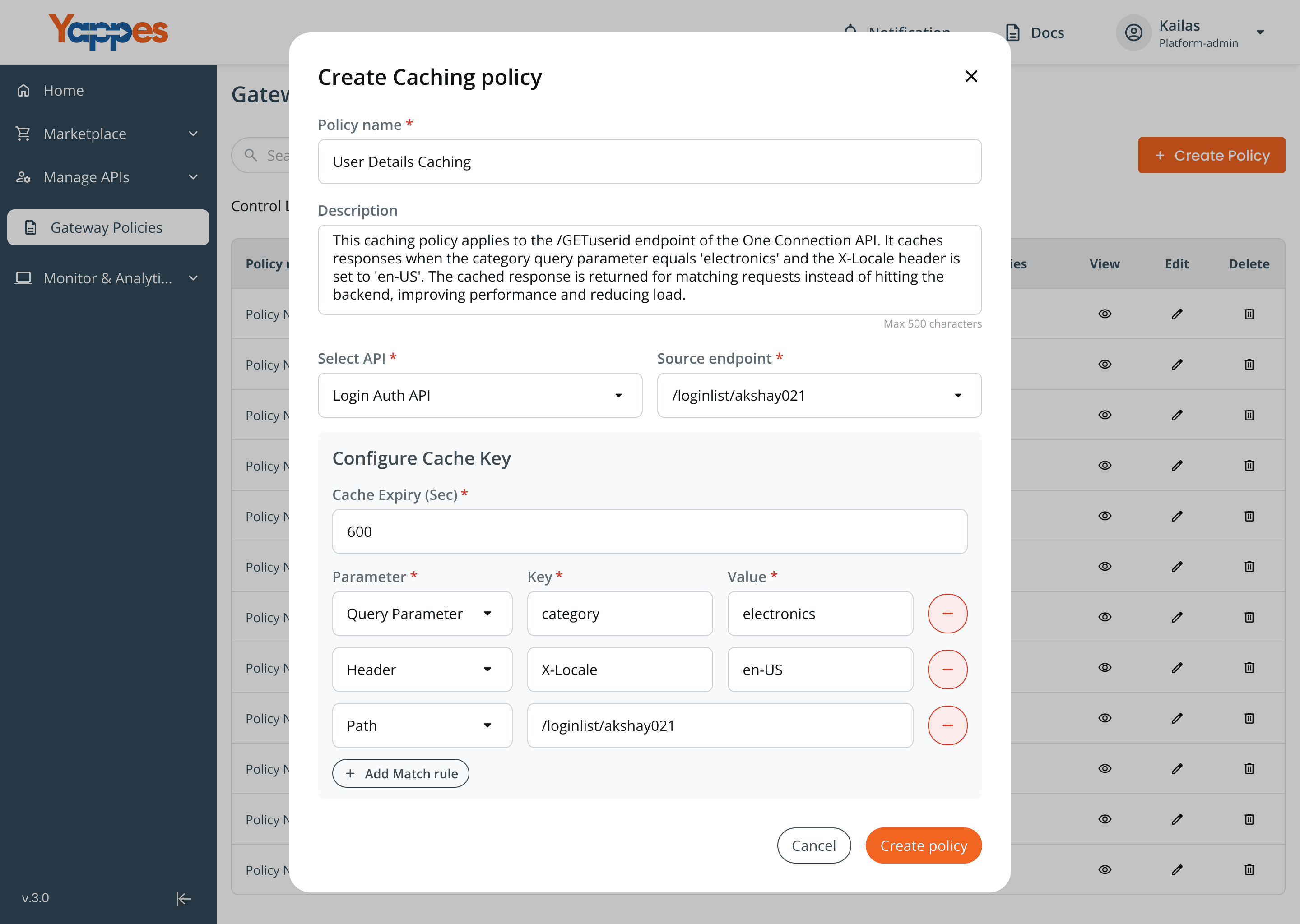
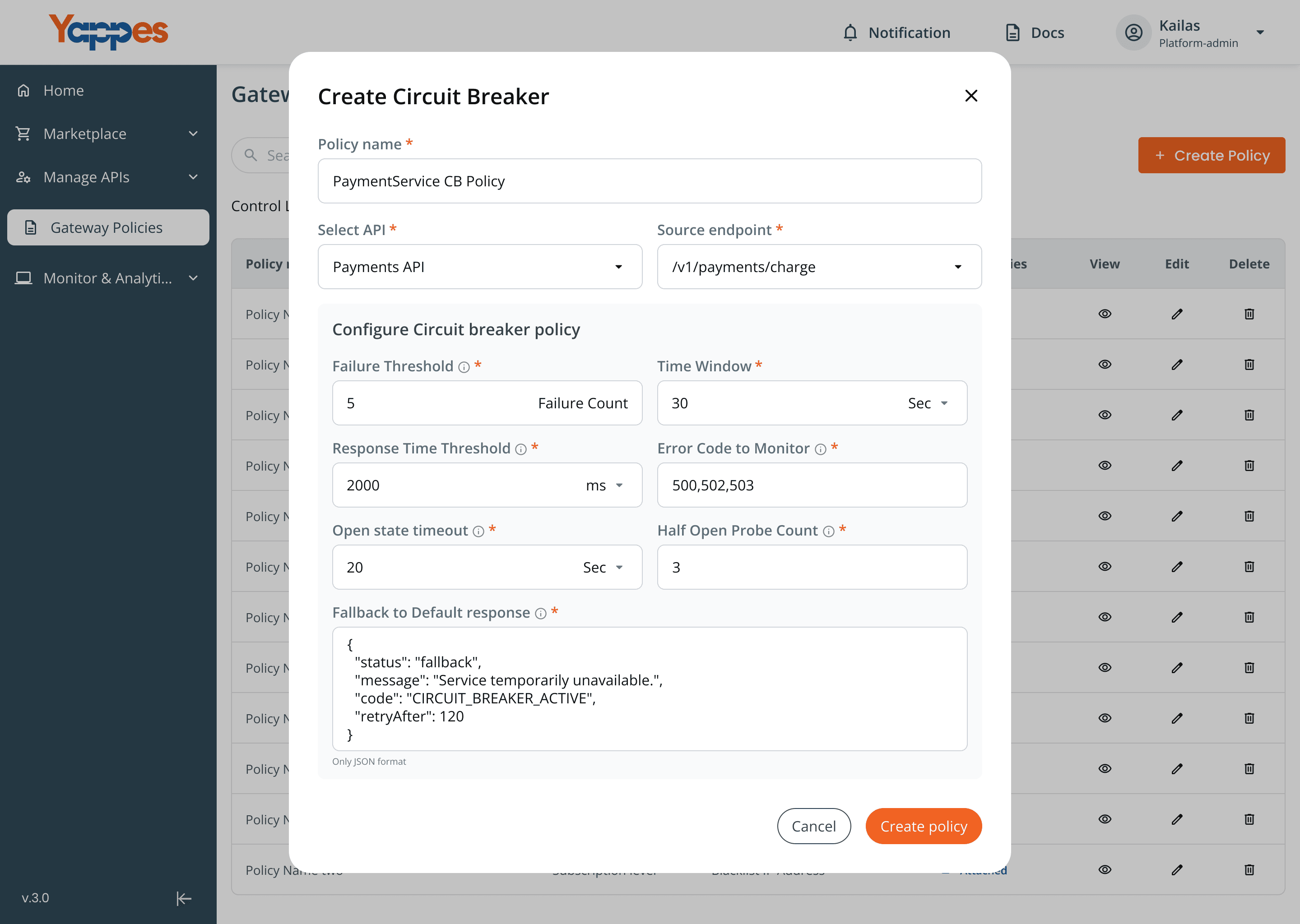
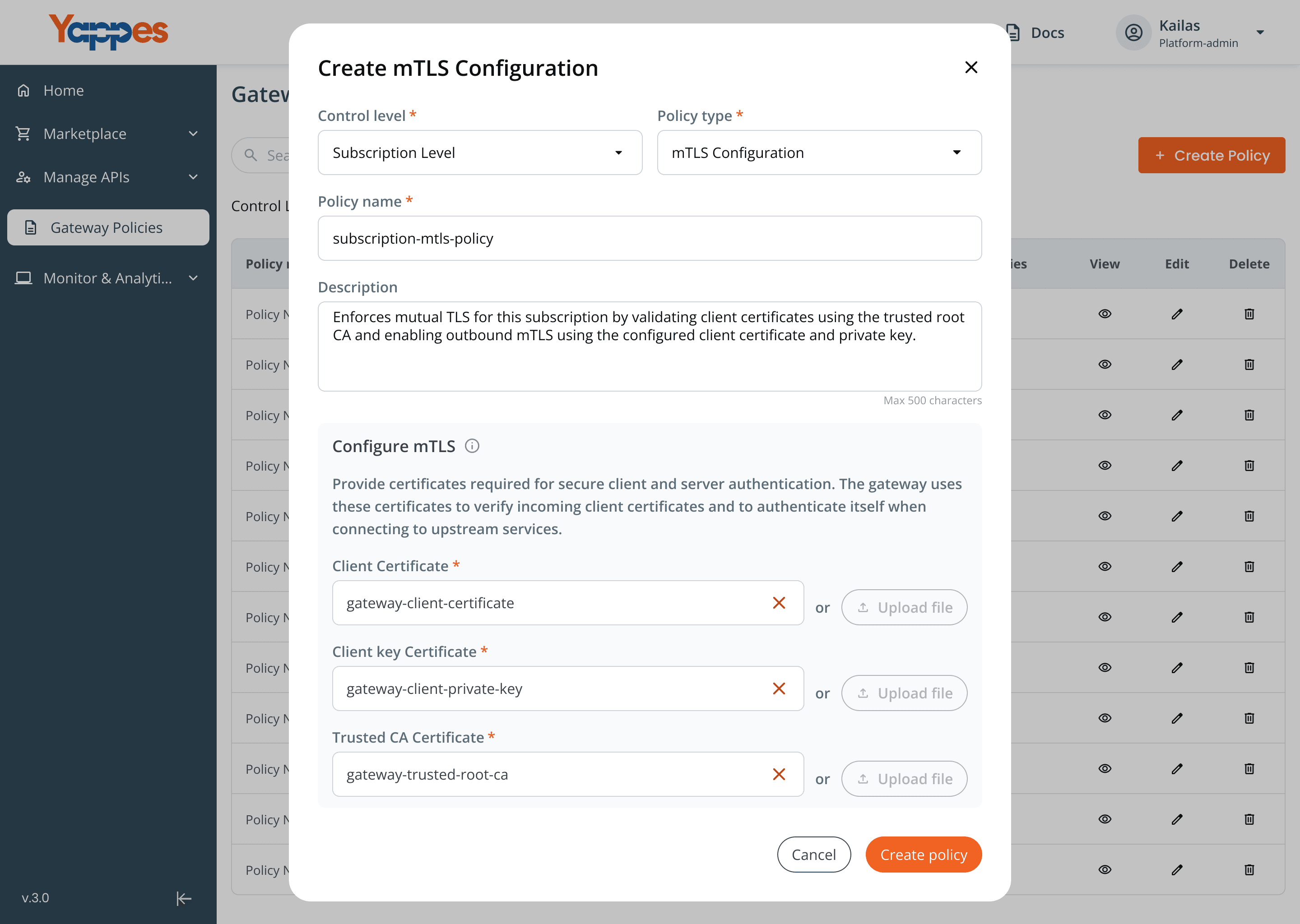
- Gateway policies, the 11 rules that run at the gateway, like caching or encryption. These share one lifecycle (Decision 1).
- Workflows: Bridge and API Orchestration. They need more than a settings form, so they got their own builder with a test step. They attach to an API or endpoint the same way a policy does.
- Onboarding: cURL, Postman
- REST, SOAP, GraphQL, WebSocket
- Mock API and data connectors
- Deploy approval and scheduling
- Marketplace listing
- Subscriptions and reports
- Billing, prepaid rate plans
- SSO login and setup
- Analytics, Regression testing
- Transformation
- Caching, Circuit breaker
- Advanced routing
- Load balancing, CORS
- Mutual TLS, Verify headers
- Schema validation
- Encryption and decryption
- Mock API response
- Bridge: XML to JSON and back
- API Orchestration
- Templates for orchestration
One lifecycle for every gateway policy
Gateway policies are rules that run at the gateway, between the caller and the backend. I moved them out of the API screens into one Gateway Policies list and gave all 11 the same lifecycle. A new policy only needs its own settings form, and everything around it is already built.
- Create the policy once, as a reusable item, and pick its control level: API, endpoint or subscription.
- Attach or detach it from one modal, on many APIs or endpoints at once.
- See where it runs: the list shows each policy's type, level and the APIs and endpoints it is attached to.
- Delete with a clear impact warning: "Deleting the policy will remove it from all the endpoints attached." The same warning appears on 15 feature pages.
Some policies needed one more step on top of the shared parts. Caching, Circuit breaker and Load balancing got Disable all, which takes every policy off its endpoints but keeps the setup, so a team can switch caching off during an incident and back on later. Transformation got a drag and drop run order, because two header changes on the same request give a different result in a different order.
Stop mistakes in the flow, not in the docs
A wrong gateway setting breaks live traffic for every customer of that API. So I built the rules into the flow, and each block tells the user exactly what to do next.
| GUARDRAIL | WHAT IT PREVENTS |
|---|---|
| Only one policy of a type per endpoint: "Throttling is already attached. Detach same type policies before attaching new ones." | Two rules fighting over the same request |
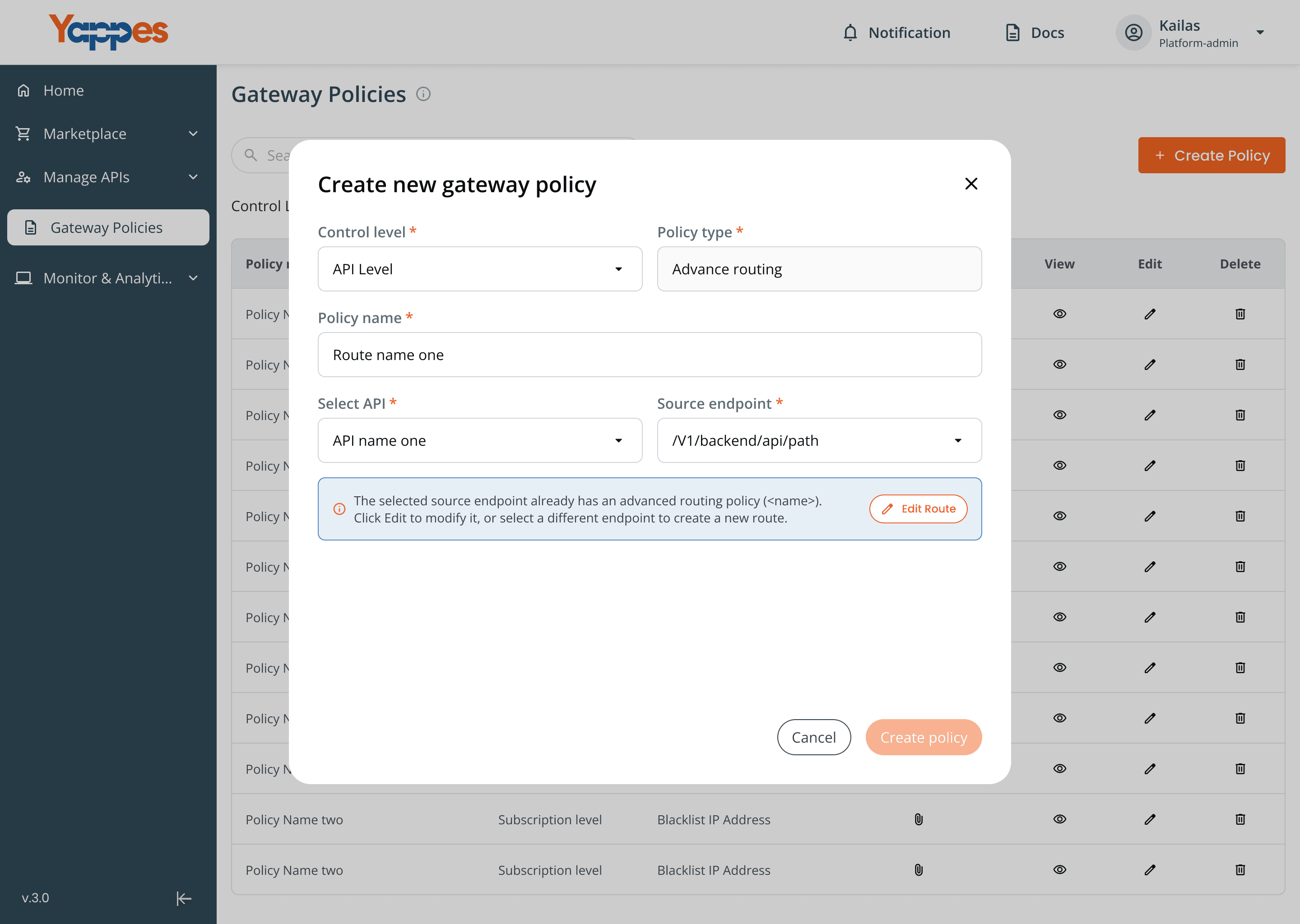
| Advanced routing and load balancing block each other, and the message names which one to turn off | Traffic sent to the wrong servers |
| SOAP APIs are hidden when picking endpoints for monitor policies | Attaching a policy where it can never run |
| A key linked to 8 encryption policies cannot be deleted until it is detached | Live APIs losing their encryption key |
| Bridge and Orchestration must be tested with sample data before they are attached | A broken payload reaching production |
EXAMPLE · ENCRYPTION & DECRYPTION · This was the hardest feature after Transformation. Users pick encrypt or decrypt, request or response, the method (asymmetric or hybrid) and a key pair from key management. Keys can be generated or uploaded, and the system detects the algorithm itself, so users don't need to know it. The policy works at subscription level, so one partner's responses can be encrypted without touching anyone else.
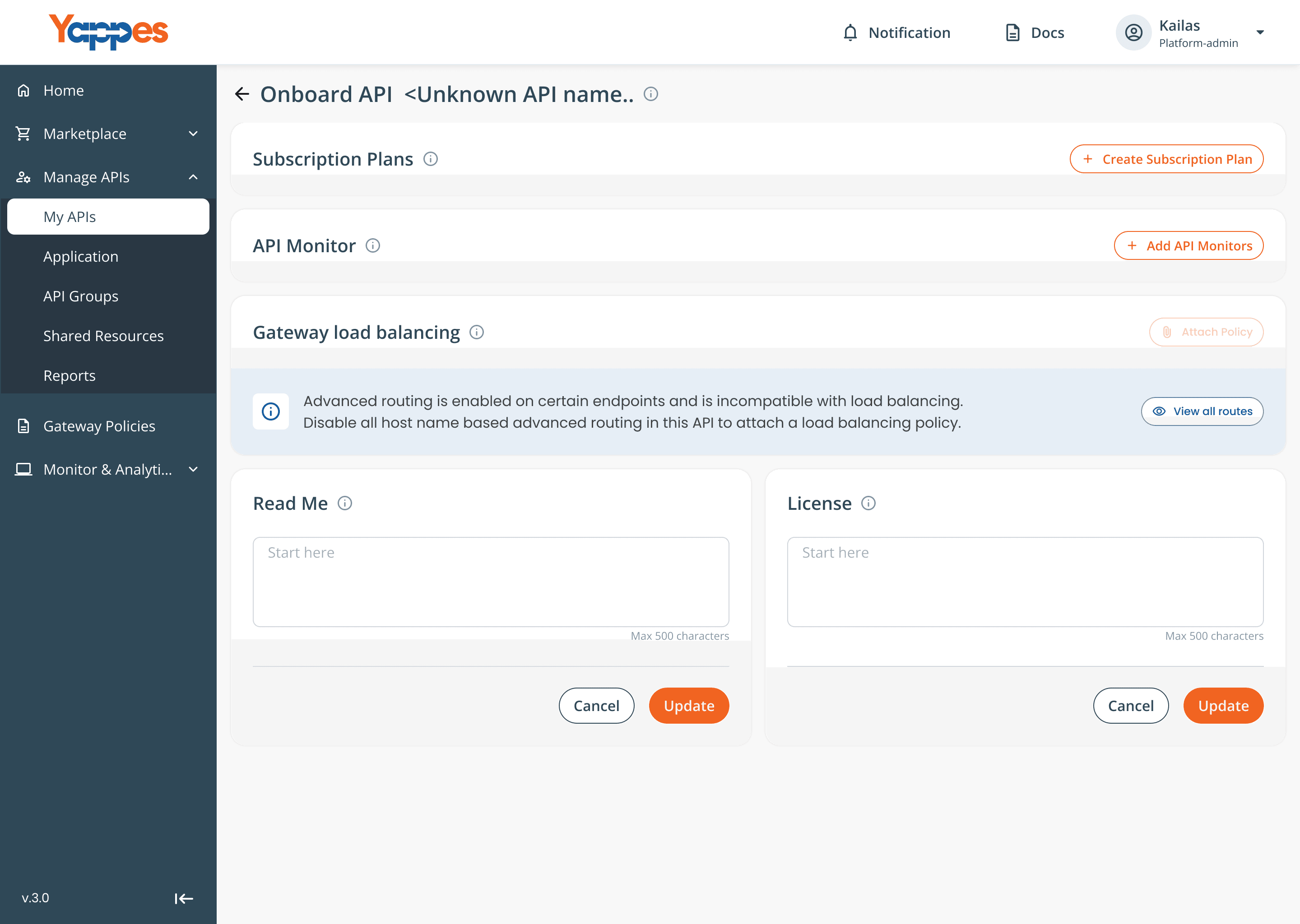
Three ways to onboard an API
Developers arrive with whatever they already have: a cURL command, a Postman collection, or just an idea. Forcing everyone through one long form loses the ones in a hurry, so onboarding accepts all three.
| PATH | BEST FOR | WHAT HAPPENS |
|---|---|---|
| Step by step | A new API, full control | A guided flow: API details, endpoints, then subscriptions and monitors |
| Paste a cURL | Trying one endpoint fast | The system reads the command and names the API from its hostname |
| Import a Postman collection | Teams with many endpoints | The whole definition comes in from one file |
Two more details made the path to a live API shorter:
- Mock responses let teams test an endpoint before the backend exists.
- Batch deploy: admins can approve several pending APIs and deploy them together during a low-usage period, instead of restarting the gateway once per API.
More features I shipped
The platform shipped 30+ features. The 11 gateway policies share one lifecycle, so later ones plugged into it instead of starting from zero.
One shared flow makes simple policies easy, but advanced ones like Bridge and Orchestration still needed their own editor and test step.
Most input came from engineers, client asks and competitor benchmarks, not from outside users. Next time I would test early with 3 to 5 real API teams.
On a platform, the pattern matters more than any one screen. Designing the system once saved work on every feature after it.
The best error message is a blocked mistake that says what to do next.